With UK housing valued at over £10 trillion, and most of that being pure equity (unmortgaged), the conversation around property tax hikes is heating up. As the government hunts for new revenue sources, property wealth stands out as low-hanging fruit. But would increasing property tax actually work? And how might it affect property investors, landlords, and homeowners?
How Property Taxes Work in the UK
What is Property Tax in the UK?
In the UK, property tax comes in several forms:
Stamp Duty Land Tax (SDLT): Paid when buying property
Council Tax: Annual tax paid by occupants
Capital Gains Tax (CGT): Paid on profit from property sales (not main residences)
Rental Income Tax: Income tax on profits from letting property
Together, these taxes raised over £10 billion in 2023/24 alone. SDLT especially targets higher-value and second-home purchases, making it feel more like a wealth tax than a transactional levy.
Inflation pushing up property values and taxable thresholds
Increased reliance on wealth-based taxation to fund public services
How Much Do Property Owners Pay?
How Much Tax Do You Pay for Owning a House in the UK?
There is no annual tax for owning a property in England, but you’ll pay:
Council Tax: £1,200–£3,000+ depending on location
Stamp Duty when purchasing
CGT if selling an investment property
How Much Property Income is Tax-Free in the UK?
You can earn up to £1,000 tax-free per year through the property income allowance, or claim allowable expenses. Higher earners pay up to 45% tax on net rental profits.
Rules You Need to Know
What is the 36-Month Rule?
If you’ve moved out of your main residence, the last 36 months of ownership still qualify for CGT relief. This protects sellers during transitions.
What is the 2-Out-of-5 Rule?
You must have lived in a property for 2 out of the last 5 years to qualify for private residence relief when selling, protecting you from most CGT charges.
What is the August Rule?
Though not a formal tax term, “August Rule” often refers to CGT timing strategies—like selling just before a new tax year. It’s commonly used in tax planning to manage thresholds or changes.
Selling, Moving & Overseas Property
Do You Pay Tax When You Sell Your House in the UK?
Not if it’s your main residence. The main residence relief makes owner-occupier home sales exempt from CGT. But investment properties and second homes do incur CGT.
Can I Sell My House and Still Live in It in the UK?
Only under sale-and-leaseback arrangements or if you transfer ownership (e.g., to family). Be aware this can affect tax liability and eligibility for CGT relief.
Do I Have to Pay Tax in the UK if I Sell My House Abroad?
Yes — UK residents must declare overseas property sales. You may owe UK CGT, but can often claim foreign tax credits to avoid double taxation.
Global Context: Property Tax Abroad
What Countries Have No Property Tax?
Countries with no annual property tax include:
Monaco
UAE
Malta
But many still charge high acquisition fees or stamp duty.
What States Have No Property Tax or Income Tax?
In the U.S.:
States with no income tax: Florida, Texas, Nevada
No state has zero property tax, but rates vary—Hawaii and Alabama have some of the lowest.
Investor FAQs & Wealth Management
What is the Most Tax Efficient Way to Buy Property in the UK?
Using a limited company structure (for buy-to-let)
Maximizing spouse exemptions and CGT allowances
Investing in areas with lower SDLT bands
Using pension funds (SIPP/SSAS) for commercial property
Is Buying Property in the UK a Good Investment?
Despite tax changes, UK property remains strong due to:
Long-term capital growth
High rental demand
Stable legal framework
But the net yield is narrowing, especially in areas hit hardest by stamp duty and reduced mortgage relief.
System Criticism & Proposed Reforms
Why Are My Property Taxes So High Compared to My Neighbors?
Possible reasons include:
Different council tax bands
Area-specific levies
Property size and valuation discrepancies
Who Raises Property Taxes?
National government: Stamp Duty, CGT
Local councils: Council Tax and specific regional levies
Does Inflation Cause Property Taxes to Go Up?
Yes. Inflation increases property valuations, leading to:
Higher SDLT upon purchase
Increased council tax banding
Greater capital gains upon sale
Future Tax Changes: What Could Happen?
Will Reliefs Be Scrapped?
The most at-risk relief is CGT allowance, which has already dropped from £12,000 to £3,000. A lifetime CGT cap on the main residence is also being discussed—though politically risky.
Is a Wealth Tax on Homes Coming?
Not officially. But stamp duty and CGT are already functioning as de facto wealth taxes, especially for:
Second homes
Foreign buyers
Properties over £1M
What Should Investors Do Now?
Model your CGT exposure across multiple properties
Consider corporate ownership for high-yield portfolios
Watch for any Autumn Budget updates on SDLT or CGT
Plan sales to maximize existing reliefs while they last
The UK government’s Register of Overseas Entities (ROE), introduced under the Economic Crime (Transparency and Enforcement) Act 2022, continues to tighten compliance. If your overseas entity no longer owns UK property, now is the time to apply for removal from the register—before you face penalties or prosecution.
Deregistration is more than housekeeping—it’s a legal obligation. Here’s your go-to guide to navigate the process with confidence.
The ROE is a public database managed by Companies House, requiring overseas entities that own or have owned freehold or leasehold UK property (7+ years) since 1 January 1999 to:
Disclose beneficial ownership
Keep ownership data updated annually
Remain transparent under UK anti-money laundering (AML) laws
If your entity qualifies but no longer owns UK land, you must formally apply for removal from the register. Otherwise, you’re still bound by annual update requirements and face non-compliance risks.
Overseas Entity
Who Are “Beneficial Owners”?
A beneficial owner is an individual or entity with significant control or ownership over the overseas entity. This includes:
Holding 25%+ of shares or voting rights
Having the power to appoint/remove a majority of the board
Exerting significant influence or control
This transparency initiative is aimed at cracking down on shell companies and illicit property purchases.
Why Should You Apply for Removal?
If your overseas entity no longer owns UK property, there are four key reasons to deregister:
1. Avoid Ongoing Compliance Costs
Annual update filings require time, effort, and sometimes professional services.
2. Eliminate Legal Liability
Remaining on the ROE subjects you to Companies House scrutiny. Non-compliance can result in fines or criminal prosecution.
If your entity’s UK activities have ceased, removal streamlines your international compliance burden.
Step-by-Step: How to Remove an Overseas Entity from the ROE
Step 1: Verify All Information
Ensure all data on file—including beneficial owners, registered addresses, and officers—is accurate and up to date.
Step 2: Engage a UK-Regulated Agent (If Needed)
If there have been changes in the information since your last update, a UK-regulated agent (e.g., lawyer, accountant) must verify them no more than three months before applying.
A regulated agent ensures your submission meets UK compliance standards.
Step 3: Submit Application Online
Visit the Companies House portal to begin. The process is straightforward with prompts at each step.
Step 4: Pay the £706 Fee
This fee includes registry checks and cannot be refunded if your application is declined.
Step 5: Wait for Confirmation
Once approved, your entry will be marked as “removed.” However, the record remains publicly visible to preserve transparency.
Overseas Entity
What Happens After Deregistration?
Your annual update obligation ends.
No further filings are required.
Your record remains searchable, showing a “removed” status but retaining historic beneficial ownership data.
This aligns with the UK’s commitment to transparent corporate governance.
Tips for Choosing a Verification Agent
Choose firms with Companies House compliance experience
Verify they are listed under a UK supervisory body
Ask about turnaround time and fees
Ensure they understand cross-border entity regulations
Legal Considerations & Recent Updates
In 2024, Companies House increased the removal application fee from £400 to £706 to cover enhanced verification protocols.
Penalties for non-compliance have risen, and spot-check enforcement is more frequent.
The “Transparency and Enforcement” reforms may introduce new thresholds for beneficial ownership disclosure.
Final Word: Take Action Today
Failing to remove your entity when no longer needed can expose you to needless legal and financial risk. The process is affordable, digital, and straightforward when you follow the steps above.
What is the register for overseas entities in the UK?
The UK Register of Overseas Entities is a public database that lists non-UK companies owning or having owned UK property since 1999. It mandates the disclosure of beneficial owners to promote financial transparency.
How much does it cost to remove an overseas entity?
As of 2025, it costs £706 to apply for removal. This includes verification checks and is non-refundable, even if the application is declined.
Who qualifies as a beneficial owner?
A beneficial owner is someone who:
Holds 25% or more of the shares or voting rights in the entity
Has the right to appoint or remove directors
Exercises significant control over the entity
FAQs: People Also Ask
What is the register for overseas entities in the UK?
It’s a public register of non-UK legal entities owning long-term UK property. Managed by Companies House, it mandates disclosure of beneficial owners to increase transparency.
Do I still need to file if I sold my UK property?
Yes—until you’re officially removed from the register, you must continue filing annual updates.
Is the removal automatic after I sell the property?
No. You must submit an official application to be removed.
Who qualifies as a UK-regulated agent?
Solicitors, accountants, and notaries who are supervised by the UK’s anti-money laundering authorities.
Can Americans register or remove companies in the UK?
Yes, foreign nationals can both register and deregister entities, but they must follow UK procedures.
Can I deregister my overseas entity if I no longer own UK property?
Yes. You must submit a formal application through the Companies House portal and meet all verification and compliance requirements.
Do I need a UK-regulated agent to apply for removal?
Yes, if any information has changed since your last update. Only UK-regulated agents can verify the updated data for compliance.
Is my data removed after deregistration?
No. Your entity’s status changes to “removed,” but its data remains publicly visible for transparency and legal traceability.
How long does the removal process take?
It varies, but typically a few weeks, depending on verification speed and application completeness.
What happens if I don’t apply for removal?
You’ll still be required to submit annual updates and could face daily fines or legal action for non-compliance.
Is this process relevant for US citizens or businesses?
Yes. The law applies to all non-UK entities, regardless of the country of origin. Americans owning or having owned UK property must follow these regulations.
Renting out property in the UK can be a profitable venture, but it’s essential to understand how rental income is taxed. This guide covers tax-free allowances, allowable expenses, tax rates, and recent changes affecting landlords. By grasping these concepts, you can manage your tax obligations effectively and maximize your rental income.
What Constitutes Rental Income?
Rental income includes:
Rent Payments: Regular payments from tenants.
Service Charges: Payments for services like cleaning or utilities.
Deposits: Portions retained for damages or unpaid rent.
All these are considered taxable income.
Why Choose Us?
Allowable Expenses for Landlords
You can deduct certain expenses from your rental income to reduce your taxable profit. Allowable expenses include:
Maintenance and Repairs: Costs for day-to-day repairs, not improvements.
Utility Bills and Council Tax: If you pay these, they’re deductible.
Insurance Premiums: Policies for building, contents, and landlord liability.
Letting Agent and Management Fees: Fees paid to agents for managing the property.
Legal and Accounting Fees: Costs for professional services related to the rental.
Replacement of Domestic Items: Like-for-like replacements of furnishings.
Accurate record-keeping of these expenses is crucial for tax purposes.
Mortgage Interest Tax Relief
Previously, landlords could deduct mortgage interest from rental income. Now, you receive a tax credit equal to 20% of your mortgage interest payments. This change affects higher-rate taxpayers more significantly.
Rental Income Tax Rates for 2025/2026
Your tax rate depends on your total taxable income:
Personal Allowance: Up to £12,570 – 0%
Basic Rate: £12,571 to £50,270 – 20%
Higher Rate: £50,271 to £125,140 – 40%
Additional Rate: Over £125,140 – 45%
These rates apply to your combined income, including rental income and other earnings.
Calculating Taxable Rental Income
To calculate your taxable rental income:
Total Rental Income: Sum all rent and related payments received.
Subtract Allowable Expenses: Deduct eligible expenses to find your net rental income.
Add to Other Income: Combine this with other taxable income to determine your tax bracket.
Apply Tax Rate: Use the appropriate tax rate to calculate the tax owed.
Self Assessment for Rental Income
If your rental income exceeds £1,000, you must file a Self Assessment tax return. Key steps include:
Registering for Self Assessment: Do this by 5 October following the tax year.
Keeping Records: Maintain detailed records of income and expenses.
Filing the Return: Submit your return and pay any tax owed by 31 January.
Accurate and timely filing helps avoid penalties.
Recent Tax Changes Affecting Landlords
Recent budgets have introduced changes impacting landlords:
Stamp Duty: Increased rates on second homes and buy-to-let properties.
Capital Gains Tax: Adjustments affecting profits from property sales.
Inheritance Tax: Changes influencing estate planning for property investors.
Staying informed about these changes is essential for effective tax planning.
If Jane’s other income is £30,000, her total taxable income is £42,000, placing her in the basic rate tax band. She’ll pay 20% tax on her rental profit.
Rental Income
Tax-Free Allowance for Rental Income
In the UK, the first £1,000 of your annual rental income is tax-free, known as the ‘property allowance’. If your rental income exceeds this amount, you must declare it to HM Revenue and Customs (HMRC). For income between £1,000 and £2,500, you can contact HMRC directly. However, if your rental income exceeds £2,500 after allowable expenses or £10,000 before allowable expenses, you are required to report it through a Self Assessment tax return. gov.uk
Allowable Expenses for Landlords
To reduce your taxable rental income, you can deduct allowable expenses. These include:
Maintenance and Repairs: Costs for day-to-day repairs, not improvements.
Utility Bills and Council Tax: If you pay these, they’re deductible.
Insurance Premiums: Policies for building, contents, and landlord liability.
Letting Agent and Management Fees: Fees paid to agents for managing the property.
Legal and Accounting Fees: Costs for professional services related to the rental.
Replacement of Domestic Items: Like-for-like replacements of furnishings.
Accurate record-keeping of these expenses is crucial for tax purposes. gov.uk
Mortgage Interest Tax Relief
Previously, landlords could deduct mortgage interest from rental income. Now, you receive a tax credit equal to 20% of your mortgage interest payments. This change affects higher-rate taxpayers more significantly. gov.uk
Rental Income Tax Rates for 2025/2026
Your tax rate depends on your total taxable income:
Personal Allowance: Up to £12,570 – 0%
Basic Rate: £12,571 to £50,270 – 20%
Higher Rate: £50,271 to £125,140 – 40%
Additional Rate: Over £125,140 – 45%
These rates apply to your combined income, including rental income and other earnings. gov.uk
Calculating Taxable Rental Income
To calculate your taxable rental income:
Total Rental Income: Sum all rent and related payments received.
Subtract Allowable Expenses: Deduct eligible expenses to find your net rental income.
Add to Other Income: Combine this with other taxable income to determine your tax bracket.
Apply Tax Rate: Use the appropriate tax rate to calculate the tax owed.
Self Assessment for Rental Income
If your rental income exceeds £1,000, you must file a Self Assessment tax return. Key steps include:
Registering for Self Assessment: Do this by 5 October following the tax year.
Keeping Records: Maintain detailed records of income and expenses.
Filing the Return: Submit your return and pay any tax owed by 31 January.
Accurate and timely filing helps avoid penalties. gov.uk
Recent Tax Changes Affecting Landlords
Recent budgets have introduced changes impacting landlords:
Stamp Duty: Increased rates on second homes and buy-to-let properties.
Capital Gains Tax: Adjustments affecting profits from property sales.
Inheritance Tax: Changes influencing estate planning for property investors.
Staying informed about these changes is essential for effective tax planning. gov.uk
If Jane’s other income is £30,000, her total taxable income is £42,000, placing her in the basic rate tax band. She’ll pay 20% tax on her rental profit.
Can I avoid paying tax on rental income if I rent out a room?
Yes, under the Rent a Room Scheme, you can earn up to £7,500 tax-free by renting out a furnished room in your main home. This allowance is per property, so if you share the income with someone else, such as a partner or joint owner, the allowance is halved to £3,750 each. It’s important to note that this exemption applies only to furnished accommodation in your main home and does not extend to properties that are not your primary residence. Additionally, if you provide additional services like meals or cleaning, these may affect the tax-free allowance. For more detailed information, refer to HMRC’s guidance on the Rent a Room Scheme. gov.uk
What happens if I don’t declare rental income?
Failing to declare rental income to HMRC can lead to significant penalties and interest charges. The severity of the penalty depends on whether the non-declaration was due to a careless mistake or deliberate concealment. For example, if you accidentally fail to declare £5,000 of rental income, you could face a penalty of up to 30% (£1,500) in addition to the unpaid tax. In cases of deliberate concealment, HMRC can impose a penalty of up to 100% of the unpaid tax. Moreover, HMRC has the authority to reclaim tax for up to 20 years if they suspect deliberate tax evasion. Therefore, it’s crucial to accurately report all rental income to avoid these penalties. Landlord Studio
Are Airbnb earnings considered rental income?
Yes, income from short-term lets, including platforms like Airbnb, is considered taxable rental income and must be declared to HMRC. Even if you rent out your property for a short period, the income is subject to tax. You can deduct allowable expenses related to the rental, such as cleaning fees, maintenance costs, and a proportion of your mortgage interest. It’s important to keep detailed records of all income and expenses related to short-term lets to ensure accurate reporting. For comprehensive guidance, refer to HMRC’s information on renting out property. gov.uk
Can I claim mortgage payments as an expense?
You can no longer deduct the full amount of mortgage interest payments directly from your rental income. Instead, you receive a tax credit equal to 20% of your mortgage interest payments. This change affects higher-rate taxpayers more significantly, as the tax credit is fixed at 20%, regardless of your tax rate. This means that higher-rate taxpayers effectively receive less relief on their mortgage interest payments compared to basic-rate taxpayers. For more information on this change, refer to HMRC’s guidance on tax relief for residential landlords.
What expenses aren’t allowable?
Not all expenses related to your rental property are allowable for tax purposes. Capital improvements, such as adding an extension or converting a loft, are considered enhancements to the property’s value and are not deductible. Personal expenses, like your own utility bills or personal travel costs, are also not allowable. Additionally, costs not directly related to the rental property, such as expenses for a second property or for personal use, cannot be deducted. It’s essential to distinguish between repairs (which are allowable) and improvements (which are not) to ensure accurate tax reporting. For a comprehensive list of allowable and non-allowable expenses, refer to HMRC’s guidance on renting out property.
FAQs
Q1: Can I avoid paying tax on rental income if I rent out a room?
Yes, under the Rent a Room Scheme, you can earn up to £7,500 tax-free by renting out a furnished room in your home.
Q2: What happens if I don’t declare rental income?
Failing to declare rental income can result in penalties, including fines and backdated tax payments.
Q3: Are Airbnb earnings considered rental income?
Yes, income from short-term lets like Airbnb is taxable and must be declared.
Q4: Can I claim mortgage payments as an expense?
You can no longer deduct mortgage interest payments directly but receive a 20% tax credit on the interest paid.
Q5: What expenses aren’t allowable?
Capital improvements, personal expenses, and costs not related to the rental property aren’t deductible.
Understanding how rental income is taxed in the UK is vital for landlords. By knowing your allowances, deductible expenses, and tax obligations, you can manage your rental income
Income tax on rent: Rental income is subject to income tax in the UK, with rates of 20%, 40%, or 45% depending on total income.
Claim mortgage interest on tax return: Mortgage interest relief is only available through the 20% tax credit, not as a deductible expense.
Tax on rental income UK: Tax is charged at 20% for basic rate taxpayers, 40% for higher rate, and 45% for additional rate.
How rent income is taxed: Rental profits (income minus allowable expenses) are taxed at your personal income tax rate.
Tax on rental income: Rental income is taxed based on total taxable income, minus allowable deductions.
How much is tax on rental income: It depends on your tax band—20%, 40%, or 45%.
Rental income: Money earned from renting out property, taxable under UK income tax laws.
Rental property income tax: Tax is charged on profits from rental property after deducting allowable expenses.
What is the tax rate on rental income: 20% (basic rate), 40% (higher rate), 45% (additional rate).
How much tax do you pay on rental income: Varies based on total income; basic rate taxpayers pay 20%, higher rate 40%, additional rate 45%.
The year 2025 marks a significant shift in the global regulatory landscape, with major changes impacting company directors, investors, and corporate governance practices. New business regulations and compliance laws are reshaping the way organizations operate, especially in areas like ESG reporting, financial disclosures, and investment management.
Whether you’re a board member or stakeholder, understanding the upcoming business regulatory changes is crucial for adapting governance compliance strategies and ensuring legal resilience.
In the U.S., regulatory changes in 2025 are being shaped by political shifts and SEC leadership transitions. The SEC is moving away from its previous ESG-focused approach and placing more emphasis on capital formation and flexibility. This includes rolling back climate disclosure rules, relaxing crypto custody accounting standards (SAB 121), and reducing oversight of private investment funds.
Investors should also be aware of changes affecting shareholder rights. New policies allow corporate boards to block shareholder resolutions more easily, especially if they involve operational micromanagement. These SEC updates for investors are reshaping proxy season dynamics and reducing the power of passive fund votes.
United Kingdom
Company directors in the UK must comply with a new identity verification requirement via Companies House. This rule, introduced in 2025, applies to all directors, Persons of Significant Control (PSCs), and company agents. It’s a key step toward boosting transparency in corporate governance.
Additionally, the UK has repealed plans to expand small company filing requirements. Businesses will no longer need to submit profit and loss accounts using iXBRL, reducing administrative burdens. Simplified rules now govern audit disclosures and director remuneration, providing more streamlined reporting pathways.
European Union
The European Union has launched major ESG reporting changes under the Corporate Sustainability Reporting Directive (CSRD). Large companies must now publish detailed disclosures on environmental, social, and governance performance.
Another critical update involves regulation of ESG rating agencies. As of 2025, these agencies must register with and be supervised by ESMA to ensure independence, transparency, and credibility. This step helps reduce greenwashing and enhances investor confidence.
Australia and Beyond
Australia has introduced mandatory climate-related risk disclosures for more than 1,800 companies starting January 2025. This makes Australia one of the first countries outside the EU to implement such stringent sustainability rules.
Other global jurisdictions, like Singapore and Japan, are also shifting toward greater investor protection, AI accountability, and cybersecurity compliance. Japan is seeing stronger shareholder activism, while Singapore is exploring how retail investors can access private market funds safely.
What Investors Should Know About 2025 Regulations
Investors face a rapidly evolving regulatory environment in 2025. The key compliance changes impacting investors include:
The rollback of ESG mandates in the U.S., which may change how ESG funds are evaluated and managed.
Expanded ESG reporting in Europe and Australia, giving investors deeper insights into corporate sustainability.
Greater focus on board accountability during proxy season, particularly related to executive pay, climate risk, and diversity.
Adjustments to capital gains taxes, corporate tax rates, and digital asset regulations, all of which impact risk management in 2025.
Understanding these regulatory changes is vital for building smarter portfolios, assessing governance risks, and identifying companies that align with long-term values.
How New Laws Affect Corporate Leadership in 2025
For corporate leaders, 2025 brings enhanced responsibility and scrutiny. Directors must adapt to new regulations for company directors in 2025, including legal identification requirements, audit rule reforms, and ESG transparency obligations.
Additionally, governance compliance has become more stakeholder-focused. Boards are expected to actively monitor climate risks, manage cyber threats, and ensure ethical use of AI in operations. These corporate law trends demand stronger internal policies and strategic oversight.
Companies that fail to align leadership practices with these regulatory expectations risk reputational damage, investor divestment, or even legal penalties.
Strategies for Regulatory Compliance in 2025
To stay compliant in this dynamic environment, companies and their directors should consider the following regulatory compliance strategies:
Train board members and executives on new compliance laws and governance expectations.
Establish dedicated ESG and risk committees to manage disclosures and sustainability goals.
Update internal controls to align with international standards such as CSRD, ISSB, and Basel III reforms.
Engage with legal and financial advisors to track global legal updates for businesses.
Building proactive strategies now helps avoid costly mistakes and improves transparency, which is vital for investor relations.
Frequently Asked Questions
What are the most important regulatory changes in 2025 for company directors?
Mandatory ID verification, simplified audit rules, and expanded ESG responsibilities are key updates.
How do 2025 regulations affect investors?
They reshape proxy season influence, sustainability data access, and overall risk exposure.
Are ESG reporting laws mandatory in 2025?
Yes, in the EU and Australia for large firms. The UK and other regions are aligning with similar standards.
What legal updates for businesses should leaders prioritize?
Focus on transparency, data security, sustainability reporting, and investor communications.
How can directors stay compliant?
By updating governance policies, engaging in training, and implementing modern risk management systems.
2025 is a landmark year for regulatory changes, bringing a wave of reforms that affect corporate leadership, investor engagement, and overall business strategy. From ESG reporting changes to new SEC updates for investors, the evolving legal landscape demands greater agility and transparency.
Whether you’re leading a boardroom or managing a portfolio, staying ahead of these developments ensures smarter decisions, lower risks, and a stronger reputation. Compliance in 2025 isn’t just a legal obligation—it’s a strategic advantage.
The UK rental market is showing signs of life as we move into 2025, with increased tenant demand in the first quarter of the year. Despite a minor decline from the same period last year, the market is experiencing a noticeable recovery, signaling a resilient housing sector. New data from Zero Deposit reveals regional variations in tenant demand, with some areas witnessing significant growth while others face a drop in interest.
The latest report highlights West Sussex as the most in-demand rental region in the UK. The data shows that 28.2% of properties were let in the first quarter, marking a modest 0.5% rise from the previous quarter, but still 3.6% lower than this time last year. Despite this dip compared to 2024, the trend indicates that rental demand remains strong overall, with many regions seeing a notable increase in activity.
Persistent Imbalance Between Supply and Demand
While there has been a slight uptick in demand from the last quarter, the fundamental issue of supply shortages continues to dominate the market. Experts had cautioned that the slowdown at the end of 2024 might not indicate a long-term trend. The first quarter of 2025 has proven them correct, with demand still outpacing supply, driving competition and fueling higher rental prices.
The peak moving season in spring and summer, which traditionally sees more tenants seeking new homes, is expected to exacerbate the pressure in the coming months. As rental listings become more competitive, tenants must act quickly to secure available properties.
UK rental market
Regional Variations in Demand
In terms of regional performance, Isle of Wight topped the demand table, showing a remarkable 17.2% increase in tenant activity. Other regions with strong growth include Rutland (14.1%), Herefordshire (8.4%), Wiltshire (7.3%), and Gloucestershire (7%). Several counties, such as Suffolk, Lincolnshire, and Devon, also reported notable increases in tenant activity, outperforming the national average.
At the opposite end of the spectrum, some areas saw a decrease in interest. Warwickshire experienced the biggest drop, with a 7.7% fall in demand, followed closely by Southampton and Tyne and Wear (7.3%), Merseyside (5.6%), and South Yorkshire (5.6%). These areas are currently witnessing less tenant activity, highlighting stark contrasts between regions.
Quick Lettings in High-Demand Areas
Certain areas also stand out for the speed at which rental properties are being let. West Sussex led with 51% of properties being let quickly, followed by Suffolk (49.1%) and Wiltshire (49%). The Isle of Wight, Rutland, and Somerset also saw high turnover rates, indicating strong demand and fast-moving rental markets.
On the other hand, regions like West Yorkshire, Nottinghamshire, and South Yorkshire experienced slower letting activity, with tenant demand being weakest in these areas. These disparities show the varied dynamics of the UK rental market, where local trends can dramatically affect rental availability and pricing.
Outlook for the UK Rental Market
Looking ahead, the UK rental market in 2025 is expected to face continued pressure as supply struggles to meet the growing demand. With the peak rental season just around the corner, it will be interesting to see whether landlords and developers can increase the availability of rental properties to alleviate the strain on the market.
Regional trends will continue to play a significant role, with high-demand areas like West Sussex, Wiltshire, and The Isle of Wight potentially seeing further price hikes due to competition. Meanwhile, areas with declining demand may experience a slowdown in rent increases, potentially offering some relief to tenants in those regions.
As the year progresses, the persistent supply-demand imbalance remains a key factor that will shape the UK rental landscape. All eyes will be on how the market evolves, especially in terms of rental prices, tenant turnover, and overall market activity.
FAQs on the UK Rental Market in 2025
Which region is the most in-demand for rentals in 2025?West Sussex emerged as the most in-demand rental region, with 51% of properties being let quickly in the first quarter of 2025.
How much has tenant demand increased in the first quarter of 2025? Tenant demand saw a 0.5% increase from the last quarter of 2024, though it remains 3.6% lower compared to the same time in 2024.
What causes the imbalance between supply and demand in the rental market? The primary issue is that tenant demand continues to exceed the available supply of rental properties. This imbalance leads to increased competition for available rentals and rising rent prices.
Which areas experienced a drop in tenant demand? Regions like Warwickshire, Southampton, and Tyne and Wear saw the biggest drops in tenant demand, with declines ranging from 5.6% to 7.7%.
How fast are properties being let in high-demand areas?West Sussex leads the charge with 51% of properties being let quickly. Other areas with fast-moving markets include Suffolk, Wiltshire, and The Isle of Wight.
What does the future look like for the UK rental market? The rental market is expected to remain under pressure, with competition for available properties intensifying as the spring and summer moving season approaches. Supply will continue to struggle to keep up with rising demand, particularly in high-demand regions.
As a property investor in the UK, rental income taxes are a significant factor to consider when managing your investments. The tax you pay on your rental income can affect your profitability, so understanding how it works is essential. This article will cover everything you need to know about rental income taxes, including how to calculate them, what expenses you can deduct, and strategies to reduce your tax liability.
1. How Is Rental Income Taxed?
In the UK, any income you earn from renting out property is subject to income tax. The amount you pay depends on your total income for the year and your tax band.
Tax Rates:
Basic Rate (20%): Income up to £50,270.
Higher Rate (40%): Income between £50,271 and £125,140.
Additional Rate (45%): Income over £125,140.
You will be taxed based on your net rental income, which is your total rental income minus any allowable expenses (discussed in Section 3).
Example:
If you earn £15,000 in rental income and spend £5,000 on allowable expenses, your taxable rental income is £10,000. If you’re in the basic tax band, you’ll pay 20% of that, or £2,000 in tax.
2. Filing Your Rental Income Tax
If you’re a property investor, you’ll need to report your rental income on a Self Assessment tax return. This is typically due by 31 January each year for the previous tax year (which runs from 6 April to 5 April).
2. Keep detailed records of your rental income and expenses.
3. Fill in the property section of the Self Assessment form.
4. Submit your return and pay any taxes due by the deadline.
Failure to submit on time can result in penalties, so it’s essential to stay on top of deadlines.
3. Allowable Expenses: What Can You Deduct?
To calculate your net rental income, you can deduct certain allowable expenses from your total rental income. These are costs incurred from managing and maintaining the rental property. Common allowable expenses include:
Mortgage Interest: You can claim 20% of the mortgage interest as a tax credit (due to recent changes in tax relief).
Repairs and Maintenance: Costs of fixing damage or wear and tear, such as repairing a roof or fixing a boiler, are deductible.
Letting Agent Fees: Fees paid to property managers or letting agents can be deducted.
Insurance: Premiums for landlord insurance policies covering buildings, contents, or liability.
Council Tax and Utility Bills (if you, as the landlord, are responsible for paying them).
Legal and Professional Fees: Costs for legal advice or accountancy services related to your rental property.
Advertising Costs: Any money spent marketing the property to find tenants.
Non-Deductible Expenses:
You can’t deduct expenses related to improvements or renovations. For example, replacing a kitchen or adding an extension would be considered a capital expense, not an allowable one.
Example:
If you earn £12,000 in rental income and have £6,000 in allowable expenses, you would only be taxed on the remaining £6,000.
If you decide to sell your rental property, you may have to pay Capital Gains Tax (CGT) on the profit you make from the sale. This tax applies to the difference between the purchase price and the sale price, minus any allowable expenses for improvements or legal fees.
CGT Rates for Property:
18% for basic-rate taxpayers.
28% for higher-rate taxpayers.
You are entitled to an annual CGT allowance of £6,000 (2024). This means you don’t pay tax on the first £6,000 of any gains.
Example:
If you bought a property for £200,000 and sell it for £250,000, your gain is £50,000. After applying the £6,000 allowance, you would be taxed on £44,000.
5. Strategies to Reduce Your Tax Liability
Reducing your tax liability as a property investor is possible through careful planning. Here are a few strategies you can use:
a. Claim All Available Expenses
Maximize your deductions by keeping thorough records of all allowable expenses. This reduces your taxable rental income, lowering your tax bill.
b. Use a Limited Company
Many investors are choosing to purchase property through a limited company. Corporate tax rates (currently 19%) are lower than higher-rate income tax, and mortgage interest can still be deducted in full. However, there are additional costs for setting up and maintaining a company, so it’s not suitable for everyone.
c. Spread Ownership Between Spouses
If your spouse pays tax at a lower rate, consider transferring part of the ownership of the property to them. This spreads the rental income and reduces the overall tax bill.
Example:
If you’re a higher-rate taxpayer and your spouse is in the basic tax band, transferring 50% of the property to them could mean they pay only 20% on their share of the rental income, instead of 40%.
d. Capital Allowances for Furnished Properties
If you let out a furnished property, you may be eligible for capital allowances. This allows you to claim for items such as furniture, appliances, and fixtures.
e. Rent a Room Scheme
If you rent out part of your home, you can earn up to £7,500 tax-free under the Rent a Room Scheme. This only applies if you’re renting out furnished rooms in your main residence, not a separate rental property.
6. What Happens If You Don’t Pay Rental Income Tax?
Failing to declare your rental income can lead to penalties from HMRC. If you’re caught under-reporting or failing to report your income, you could face:
Fines of up to 100% of the unpaid tax.
Interest on the unpaid amount.
Criminal charges in severe cases.
To avoid these penalties, make sure you file your tax return on time and declare all rental income accurately.
As a property investor in the UK, rental income tax is an unavoidable part of owning property. Understanding how taxes work and taking full advantage of allowable expenses and tax-saving strategies can help you maximize your returns. Whether you’re managing a buy-to-let or considering selling a property, it’s essential to plan your tax strategy carefully.
If you’re unsure about the best approach, consulting with a tax professional can help you navigate the complexities of the UK tax system and reduce your overall liability.
FAQs
How do I calculate my rental income tax?
Subtract allowable expenses from your total rental income to get your taxable rental income. Then, apply the relevant tax rate based on your income band.
Can I deduct mortgage payments from rental income?
You can deduct the interest portion of your mortgage payments, but the principal repayment isn’t deductible.
Is renting out my property through a limited company worth it?
It depends on your personal circumstances. For high earners, it could save money on taxes, but it comes with additional administrative costs.
What happens if I don’t file my rental income tax return on time?
HMRC can fine you, and you may also owe interest on any unpaid taxes.
Property Allowance
The UK offers a property allowance that allows individuals to earn up to £1,000 per tax year from property rental income without paying tax. If your rental income exceeds this allowance, you can choose to deduct the £1,000 instead of actual expenses when calculating your taxable profit. This can be beneficial for landlords with minimal expenses. gov.uk
Non-Resident Landlords
If you reside outside the UK but receive rental income from a UK property, you’re still liable to pay UK income tax on that income. The Non-Resident Landlord Scheme requires either your tenant or letting agent to deduct basic rate tax from your rental income before it’s paid to you, unless you have received approval from HMRC to receive the income gross. gov.uk
Record-Keeping and Reporting
Maintaining accurate records of all rental income and expenses is essential. Landlords are required to report rental income to HMRC through the Self Assessment tax return system. Proper documentation supports the figures reported and ensures compliance, helping to avoid potential penalties for misreporting. ukpropertyaccountants.co.uk
Capital Allowances
While traditional buy-to-let residential properties have limited scope for capital allowances, landlords of furnished holiday lettings (FHL) can claim capital allowances on items such as furniture, equipment, and fixtures. This can significantly reduce taxable profits. However, it’s important to note that upcoming tax changes in 2025 may affect the benefits associated with FHLs. ft.com
Tax Rates and Personal Allowance in the UK
The UK income tax system is progressive, with rates increasing with higher income levels. As of the 2024/25 tax year, the personal allowance is £12,570, meaning you don’t pay tax on the first £12,570 of your income. However, this allowance decreases by £1 for every £2 of income over £100,000, and is completely removed once your income exceeds £125,140. gosimpletax.com
Penalties for Non-Compliance
Failing to accurately report rental income or missing tax return deadlines can result in significant penalties. Common mistakes include not registering for Self Assessment on time, failing to pay the tax bill promptly, and simple errors such as typos in personal information or the unique tax reference (UTR). It’s crucial to file early and accurately to avoid interest accruals and penalties. thetimes.co.uk
By staying informed about these aspects of rental income taxation, you can better manage your property investments and ensure compliance with HMRC regulations
UK Property Rental Income & Tax FAQs
How is property rental income taxed in the UK? Rental income is taxed as part of your overall income and is subject to Income Tax at 20% (basic rate), 40% (higher rate), or 45% (additional rate) depending on your total earnings. You can deduct allowable expenses before calculating taxable profit.
Do foreign investors have to pay tax in the UK on rental income? Yes, non-residents must pay UK Income Tax on rental income from UK properties. They are usually taxed at the same rates as UK residents but may need to register under the Non-Resident Landlord Scheme (NRLS).
Do renters pay property tax in the UK? Renters do not pay property tax, but they are responsible for Council Tax, unless the landlord includes it in the rent. Council Tax varies by local authority and property valuation band.
Do I pay tax on rental income if I have a mortgage in the UK? Yes, rental income is taxable even if you have a mortgage. However, landlords can no longer deduct mortgage interest directly but receive a 20% tax credit on mortgage interest payments.
How can I avoid paying tax on rental income in the UK? You cannot avoid tax, but you can reduce it by deducting allowable expenses (repairs, insurance, property management fees) and using tax-efficient ownership structures like joint ownership or holding property through a limited company.
What is the tax rate on rental income for non-residents in the UK? Non-residents are taxed at the same rates as UK residents (20%, 40%, or 45%) but may be eligible for double taxation relief if their home country has a tax treaty with the UK.
What is the capital gains tax on rental property in the UK? When selling a rental property, Capital Gains Tax (CGT) applies:
18% for basic rate taxpayers
24% for higher and additional rate taxpayers (was 28% before April 2024) A £6,000 annual CGT allowance (2024/25) applies before tax is due.
Can I put rental income into a pension in the UK? Yes, you can contribute rental income into a pension (like a SIPP), but tax relief is available only up to 100% of your annual earned income (not passive income like rent).
Which countries have a double taxation agreement with the UK? The UK has double taxation treaties with over 130 countries, including the USA, Canada, Australia, France, Germany, China, and India. These treaties prevent taxpayers from being taxed twice on the same income.
Is there tax on UK residential property for non-residents? Yes, non-residents must pay Income Tax on rental income and Capital Gains Tax (CGT) on property sales. They may also be subject to Stamp Duty Land Tax (SDLT) and Annual Tax on Enveloped Dwellings (ATED) if owning through a company.
Can foreigners rent out property in the UK? Yes, foreigners can rent out property in the UK, but they must comply with UK tax laws and may need to register under the Non-Resident Landlord Scheme (NRLS) if living abroad.
Are utilities included in rent in the UK? It depends on the tenancy agreement. Some landlords include utilities (gas, electricity, water, internet, council tax) in the rent, while others require tenants to pay separately.
What is the new landlord tax in the UK? Recent changes include:
Mortgage interest tax relief limited to 20%
Higher CGT rates (was 28%, now 24% for landlords)
Making Tax Digital (MTD) for landlords earning over £50,000 (from April 2026)
Is rent taxable if my boyfriend pays me in the UK? Yes, rental income is taxable regardless of who pays it. However, if you live in the property and share costs, it may not be classified as rental income.
What is the renters’ tax credit in the UK? There is no general renters’ tax credit in the UK, but housing benefits or Universal Credit may assist eligible tenants. Scotland has proposed a renters’ tax relief, but it is not yet law.
What expenses can you claim for rental property in the UK? Landlords can deduct expenses like:
The Annual Tax on Enveloped Dwellings (ATED) is a tax that applies to high-value residential properties owned by companies, partnerships with corporate members, or collective investment schemes in the UK. It was introduced in 2013 and mainly targets properties valued above £500,000 that are owned through a corporate structure, rather than by individuals.
A crucial part of ATED is the Valuation Rule, which determines how to assess the value of a property for tax purposes. This rule is significant because the amount of ATED tax owed depends directly on the value of the property. The following section explains the ATED valuation rules, including how property values are determined, when valuations are required, and the effect of valuations on the tax liability.
ATED: Key Considerations: Valuations
The Annual Tax on Enveloped Dwellings (ATED) tax year runs from 1 April to 31 March, and the tax return must be filed within a set period after the end of the tax year. The valuation of the property is a key factor in determining the amount of ATED annual charge payable.
The valuation rule refers to the method of determining the market value of a residential property for the purposes of ATED. The valuation is a fundamental aspect because the amount of ATED owed is based on the value of the property, and properties above a certain threshold are subject to the tax.
ATED Valuation Rules
Key Valuation Dates for ATED
The Valuation Rule is tied to specific dates that establish when and how a property should be valued for ATED purposes:
1 April 2012: This is the initial valuation date for properties that were owned on or before this date. When ATED was first introduced, the market value of these properties on 1 April 2012 determined whether the property was subject to the tax.
Acquisition Date: If the property is purchased after 1 April 2012, the valuation date becomes the date of acquisition, meaning the market value on the day the property is bought determines the ATED liability.
Five-Year Revaluation Cycle: After the initial valuation, properties must be revalued at least every five years. The most recent revaluation date was 1 April 2022, and the next revaluation date is 1 April 2027. If a property is purchased before the end of a five-year period, it must still be revalued according to the standard five-year cycle, not the remaining years. For instance, if the property is valued in 2024, the next revaluation will still occur in 2027, not 2029.
The value of the property for any chargeable period is therefore the later of:
its initial valuation date
the revaluation date
The five-year cycle ensures that the valuation reflects current market conditions and is crucial for maintaining the accuracy of tax liabilities over time.
When Revaluation Is Required
Revaluation is necessary under certain circumstances, such as:
Initial Valuation: For properties owned on 1 April 2012, or after this date, the value must be established as of the acquisition date or 1 April 2012, as applicable.
Five-Year Cycle: Properties must be revalued every five years, ensuring the tax reflects any changes in the market.
Significant Renovations or Disposals: If a property undergoes major renovations or improvements that significantly increase its value, or if a substantial portion of the property is sold or disposed of, a revaluation may be required before the five-year mark.
Major Renovations and Disposals
A substantial acquisition or disposal triggers a revaluation for ATED purposes. For example, if a property was valued at £5 million on 1 April 2012, and the owner sold part of it (like a small piece of land) for £200,000 on 30 August 2014, the revaluation would not simply be £4.8 million (the original value minus £200,000). Instead, the property would need to be revalued based on the market value of the remaining interest as of the disposal date, which could even change its value significantly.
An acquisition is considered “substantial” if the buyer pays £40,000 or more for the property or any part of it, including any linked transactions.
A disposal of part of the property (but not the whole property) is considered “substantial” if the value of the part sold is £40,000 or more.
ATED Valuation Rules
Transactions Between Connected Parties
If the transaction involves connected parties (such as family members, friends, or businesses with shared interests), special rules apply. In such cases, the market value of the property is used for ATED purposes, not just the price agreed upon between the parties. This is to prevent under-reporting of the property’s value, ensuring that the tax is based on a fair and accurate valuation.
Valuing the Property: How to Proceed
You have two options for valuing your property:
Self-Valuation: You can personally assess the value of the property, but it must reflect the market price that a willing buyer and seller would agree upon.
Professional Valuation: Hiring a professional property value is another option, which may offer more assurance regarding the accuracy of the valuation.
The key point here is that the valuation should be reasonable and justifiable. HMRC will usually accept self-valuations but may challenge them if they believe the valuation is incorrect.
FQSs
What are valuation rules?
Valuation rules are guidelines or methods used to determine the monetary value of an asset, business, or property. These rules vary depending on the purpose of the valuation, such as taxation, financial reporting, or investment analysis.
What is the purpose of ATED?
The Annual Tax on Enveloped Dwellings (ATED) is a UK tax designed to discourage companies from holding high-value residential properties. It ensures such properties are taxed appropriately when owned by corporate entities, partnerships with corporate members, or collective investment schemes.
How to avoid ATED?
To avoid ATED, property owners can:
De-envelope the property – Transfer ownership from a corporate entity to an individual.
Claim applicable reliefs – Available for rental businesses, property developers, or properties open to the public.
Ensure the property value is below £500,000 – ATED applies to properties above this threshold.
Since de-enveloping can have other tax implications, consulting a tax professional is recommended.
What is the meaning of ATED?
ATED stands for Annual Tax on Enveloped Dwellings, a tax on certain high-value UK residential properties owned by non-natural persons (e.g., companies or investment funds).
What is the formula for valuation?
Valuation formulas depend on the asset being valued. Common methods include:
Discounted Cash Flow (DCF) Analysis – Calculates the present value of expected future cash flows.
Comparable Company Analysis – Values a business based on similar companies.
Precedent Transactions – Uses past sales of similar assets to determine value.
In the context of UK taxation, Rule 2 of the valuation rules refers to specific guidelines for determining the market value of assets for tax purposes. The exact rule may vary based on the legislation being applied.
What is de-enveloping?
De-enveloping is the process of transferring ownership of a property from a corporate entity (the “envelope”) to an individual. This is often done to avoid taxes like ATED but may have other tax consequences, such as Stamp Duty or Capital Gains Tax.
What is NRCGT?
NRCGT stands for Non-Resident Capital Gains Tax. It applied to non-residents disposing of UK residential property between 6 April 2015 and 5 April 2019. From 6 April 2019, it was expanded to cover all UK land and property owned by non-residents.
Is “ated” a suffix?
Yes, “-ated” is a suffix used in English to form adjectives indicating a condition or state, such as “complicated” or “animated.”
What is the meaning of “coppy”?
“Coppy” is an old English term referring to a small coppice or thicket of trees. It is not commonly used today.
What is the meaning of “ture”?
“Ture” is not a standalone word in English but is a suffix found in nouns like “nature” and “structure.”
How much is NRCGT?
The Non-Resident Capital Gains Tax (NRCGT) rates are:
Individuals – 18% or 28%, depending on income level.
Companies – 20%.
These rates apply to gains from UK property disposals by non-residents.
What is the remittance basis?
The remittance basis is a UK tax treatment that allows non-domiciled residents to be taxed only on foreign income and gains brought (“remitted”) into the UK, instead of being taxed on worldwide income.
Am I still a UK resident if I live abroad?
UK tax residency depends on factors such as:
The number of days spent in the UK.
Ties to the UK (family, property, work).
The Statutory Residence Test (SRT) determines residency status. In some cases, you can still be considered a UK resident while living abroad.
What ends with “ated”?
Many English words end with “-ated,” such as:
Complicated
Animated
Dedicated
Isolated
Frustrated
This suffix often indicates a condition or state resulting from an action.
What is the full meaning of “ate”?
“Ate” is the past tense of the verb “eat,” meaning to have consumed food. It can also be a suffix in words like “dominate” or “activate.”
What does the stem “ate” mean?
The stem “ate” comes from Latin and often means “to cause” or “to make” in verbs like “educate” (to cause learning) or “animate” (to bring to life).
A personal tax account is an HMRC-initiated system to make the tax system in the UK more efficient and transparent. This system facilitates you to access all your tax-related personal information in one place. Through your tax account, you can solve your tax issues on time by yourself without writing or calling the HMRC. You are probably wondering, how do I set up my personal tax account?
If you have access to your personal tax account, it means you can save a great deal of your time and energy. You can manage and handle your tax matters in a much better way. The personal tax account system was started in 2015 and it has been a splendid success since then as it saves countless hours by dealing with everything online. Surely, it is for the best that you set up your personal tax account.
What Can I Do with My Personal Tax Account?
The list of services for the personal tax account is constantly expanding and growing. Therefore, you can avail of many useful financial services from your personal tax account that include:
Checking income tax code.
Finding the national insurance number.
Organising tax credits.
Claiming a tax refund.
Checking your income tax estimates.
Paying overdue taxes.
Updating or checking your marriage allowance.
Checking the latest updates on the value of the state pension.
Adding a family member or other trustworthy person to manage your account on your behalf.
Viewing your self-assessment tax calculation, which might be helpful in applying for credit.
If there is any error or miscalculation in anything like details or anything else, you can change it by yourself. This guide will help you comprehend how do I set up my personal tax account.
What are the Benefits of setting up a Personal Tax Account?
The personal tax account system is an attempt by the HMRC to make the taxation system more transparent and efficient. With the use of this taxation system, it becomes easier for you to update the HMRC about the changes to your circumstances, like getting married, having a baby, and changing your address. It enables you to change your child’s benefits circumstances, such as if the child joins or leaves education or training. If you are a parent, then you can keep track of child track credits. you can check or update the benefits you get from your work such as car insurance, or company car details.
The major benefit of the personal tax account is that everything relating to your tax affairs will be online in one place. Hence, you will not have to spend time finding out different papers to get the details of your taxes.
Also, creating your personal tax account enables you to monitor your tax-related affairs to make sure that your records are accurate and up to date.
It is less time-consuming, more transparent, less difficult, more immediate, and entirely paperless. This process does not require lengthy letters but easy texting messages or emails- so you will be doing good for the environment too. Thus, it is an ideal situation.
Certainly, it is human nature to envisage every new thing as difficult until becoming familiar with it. But setting up your personal tax account with HMRC is like something easier done than said.
Setting up a personal tax account is not time-taking or technicalities involving the job at all. According to HMRC, it should only take 5-10 minutes.
Personal Tax Account
To start with, you must log in to your government gateway account.
The form online available is itself much easier to follow as it simply involves inputting your information and setting up security protocol. At this stage, the time factor entirely depends on the organization of the paperwork you start with. The more your paperwork is organized, the less time will it takes. Let’s discuss the paperwork you require to understand how I set up my personal tax account.
What do you need to Apply for the Paperwork?
National insurance number.
Recent pay slip.
UK passport (must be on date) or most recent P60.
Landline number or your mobile number, as part of the two-step security.
Choose the email address you want to attach to the account.
Now, you have acquired all the needed information to set up your personal account. Just go to the government gateway, and select either individual, (if you represent your own business) or agent (if you represent other people in financial matters to the government) to start the registration process.
How can I create my personal tax account?
There are a few steps to set up your personal tax account. We share those steps one by one in a largely simplified way.
1. Registration
You will need to register online by using this link on the official websiteof the HMRC to access the personal tax account.
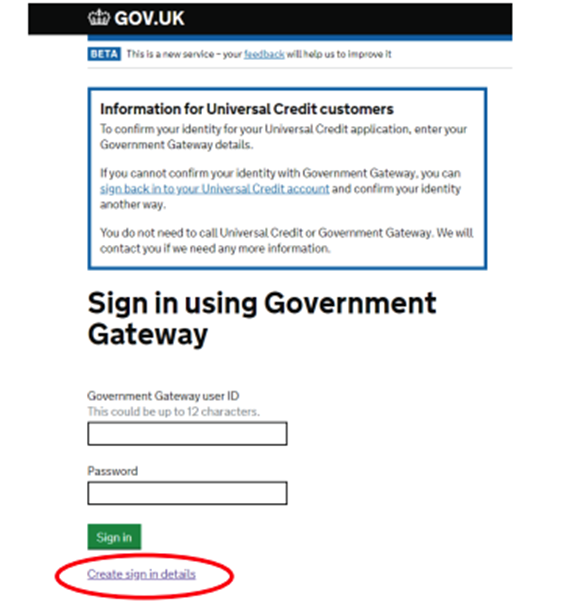
Click the ‘create sign-in details’ link given below the sign-in button to begin the registration process.
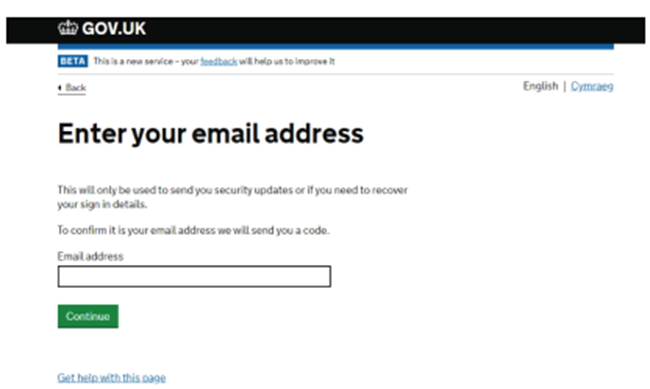
Then you will have to enter your email address. After doing so, select Continue.
You will receive a code of 6 characters from HMRC at this email address.
Once you have entered the details in the given box, HMRC will prompt you to enter your full name and create a password. Then you will see your Government Gateway ID number.
2. Setting up your account
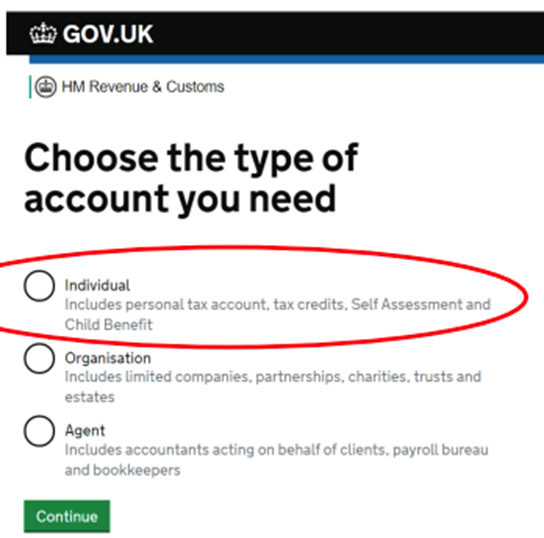
Here the HMRC will ask you to select the type of account you need. Please select “individual” and then click the green button of “continue”.
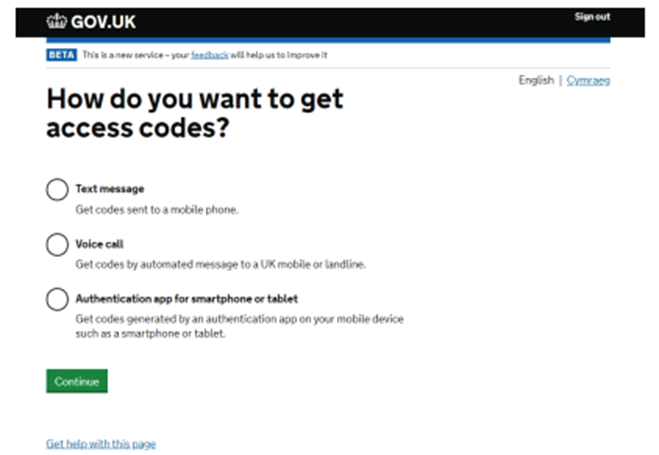
Now the HMRC will ask you to set up a method to receive an access code. It is important to know that select a method you are quite comfortable with because HMRC will use this method to send you an access code, every time you sign by using your Government Gateway user ID.
After selecting the method, you are most convenient with, click on the green button of “continue”.
Then HMRC will ask you to enter the 6 digits access code it has provided you with.
Kindly, enter the code and then click the green button “continue”.
Now HMRC will ask you to confirm your identity, please provide the details where asked and then click the green button of “continue”.
Now HMRC will ask you the way you want your identity o be confirmed by the HMRC. If you are a UK passport holder, you are recommended to use this option.
HMRC will ask you to share the same detail you have on your passport. Please enter the required details and then click the green button of “continue”.
Now HMRC will confirm whether the details you entered are correct and whether the personal tax account has been successfully set up. After its confirmation, you will be asked whether you would like to receive your correspondence regarding your tax affairs electronically or post via your Personal Tax Account. please select the option which is most suitable to you and select the green “continue” button. Now you will be taken to the Personal Tax Account home page.
3. Recovering Login Details
If you have previously used the online services of the government Gateway or HMRC to submit your tax returns electronically via the website of HMRC. You must log in by using those account details. But if you have forgotten the details of those accounts then please select one of the links given at the bottom of the sign-in page depending on the details you need to recover.
Now HMRC will take you, according to its process to recover your Government Gateway user ID or password.
If you face any difficulty with the process, you can easily contact HMRC for help.
Safety and security with your Personal Tax Account
After completing the registration procedure, you are the only person to have access to your personal tax account with your user ID and password.
Therefore, that answers your question, how do I set up my personal tax account?
Can my Personal Tax Account Help Review my National Insurance Record?
When it comes to reviewing your National Insurance record, your personal tax account can be particularly helpful. You can easily review your national insurance record that covers your entire working history by accessing your personal tax account. Reviewing your National Insurance record helps you ensure that your entire record is accurate and up to date. It also identifies any gaps in your contributions that might need to be addressed.
After that, when you reach the pension age, you can ensure that you have the correct credits to receive a full pension. If you find any discrepancies and gaps, the best option is to contact HMRC for investigation.
Can my Personal Tax Account Help Review my Employment Records?
Yes, your personal tax account gives you the additional benefit of reviewing your employment records.
It’s another benefit is that if you cannot obtain a copy of your P60 from your employer, you get it from your personal tax account. Once you understand how I set up my personal tax account, you can move forward with these steps.
Can Personal Tax Accounts Provide Information on PAYE codes?
Another useful feature of a personal tax account is that it enables you to view the PAYE codes use applied to your employment.
Moreover, you also have the option to modify your PAYE code directly from your personal tax account.
Is your Personal Information Secure?
When it comes to security, HMRC takes it seriously and uses firewall protection for all its systems. This is like a bulwark to provide maximum protection for your information because its detective capacity is strong enough to detect any unauthorized entry. All the data that you share with HMRC is encrypted and nobody can see your data except yourself.
Furthermore, you also must be conscious and vigilant of your online safety. Avoid sharing your user ID or password with anybody. If you cannot remember it and want to note it down, then ensure to keep it in a discrete place. Surely, you now have a clear idea of how I set up my personal tax account.
How Can I Ensure Nobody Accessed My Account?
One of the easiest ways, you must know whether someone accessed your account or not is the security measure of the system that shows you the time and date you logged into your personal tax account. Check this list frequently, if see any such thing that does not look right, immediately contact HMRC through their website.
Another safety measure built into the system is automatic logging out of your account if it is not active after 15 minutes. If you are forgetful, don’t worry, the system will secure your account.
Does HMRC Ask for Personal and Financial Detail?
It is important to know, and HMRC often emphasizes to be mindful of the procedure of HMRC that it does not ask for any personal or financial details by email, phone, or text. Always be on watch to protect yourself from the scammer, if notice any such thing as suspicious, report it to the HMRC, even if you have not lost anything. Undoubtedly, it is in your best interest to do so.
Shortly speaking, setting up a personal tax account offers a wide range of benefits by saving you a great deal of energy and time that you can utilize in something more productive and creative. You can easily check state pensions, national insurance contributions, and many other tax affairs online without standing in long queues on helplines or doing related paperwork. It keeps you updated and informed about your tax status. And through it, you can also keep HMRC timely updated and informed about your circumstances. Most importantly, your financial information is safe and secure.
FAQs
How do I activate my UTR number?
If your UTR (Unique Taxpayer Reference) is inactive, you can reactivate it by:
Contacting HMRC – Call the Self Assessment helpline and request reactivation.
Providing Personal Details – You may need to confirm your full name, address, National Insurance number, and date of birth.
Waiting for Confirmation – HMRC will confirm reactivation, usually via letter or phone.
How to check income tax?
You can check your income tax by:
Logging into your HMRC Personal Tax Account – View your tax payments, liabilities, and tax code.
Using the HMRC App – Check your tax status on the go.
Contacting HMRC – If you have queries about your tax records, call them for assistance.
How to file income tax?
To file your income tax return:
Register for Self Assessment if you haven’t already.
Gather Necessary Documents – Income records, expenses, and other tax-related details.
Complete Your Tax Return – Log in to your HMRC account and fill out the SA100 form.
Submit Before the Deadline – The deadline for online submissions is usually 31 January.
How do I create a UTR account?
To get a UTR number:
Register for Self Assessment with HMRC.
Provide Personal Information – Full name, address, date of birth, and National Insurance number.
Wait for UTR to Arrive – It is usually sent by post within 10 working days in the UK.
How do I check if my UTR is active?
You can check if your UTR is active by:
Logging into your HMRC account to view your Self Assessment status.
Calling HMRC – Provide your UTR and ask if it is active.
How to set up self-employed?
Register with HMRC for Self Assessment.
Keep Records of your income and business expenses.
Submit Your Tax Returns Annually to pay the correct amount of tax and National Insurance.
How do I check my UTR online?
You can find your UTR number by:
Logging into your HMRC account – Your UTR is listed in your tax documents.
Checking Previous HMRC Letters – It appears on tax returns and payment reminders.
How do I check my active tax status?
Use Your HMRC Personal Tax Account – Check your tax payments and liabilities.
Contact HMRC – If you’re unsure about your status, they can confirm it.
How long does it take to get a UTR?
HMRC usually issues a UTR within 10 working days if you’re in the UK or 21 days if you’re abroad.
How much money do you have to make as a self-employed person?
If you earn over £1,000 per tax year from self-employment, you must register with HMRC and file a tax return.
How do self-employed get money?
Self-employed individuals earn money by:
Charging clients/customers directly for services.
Selling products online or in-store.
Receiving payments through invoices, bank transfers, or platforms like PayPal.
How can I make money from home self-employed?
Options for making money from home include:
Freelancing – Writing, graphic design, programming, etc.
E-commerce – Selling on platforms like eBay, Etsy, or Amazon.
Affiliate Marketing – Promoting products for commissions.
Online Courses – Teaching skills through platforms like Udemy or Teachable.
How to earn $1,000 per day from home?
Earning $1,000 per day requires high-income skills or scalable businesses:
Dropshipping or E-commerce – Selling trending products online.
Stock Trading or Cryptocurrency – Requires experience and risk management.
Freelance Consulting – High-ticket services like business coaching.
Online Courses & Digital Products – Selling valuable knowledge at scale.
What is the fastest way to become self-employed?
Identify a skill or service you can offer immediately.
Register as self-employed with HMRC.
Find clients through online platforms like Fiverr, Upwork, or LinkedIn.
Start small and reinvest earnings to grow your business.
How to earn money from Google at home?
Google offers multiple ways to make money:
Google AdSense – Earn from ads on a blog or YouTube channel.
Google Play Store – Develop and sell apps.
Google Opinion Rewards – Get paid for surveys.
YouTube Partner Program – Monetize videos through ads and memberships.
Research and Development R&D Tax Credits are one of the most underutilized tax reliefs available to UK businesses. These credits were introduced over two decades ago with the aim of encouraging companies to invest in innovation. Yet, many businesses fail to claim R&D tax credits, either because they are unaware of their eligibility or because they mistakenly believe that R&D is only applicable to scientific research in laboratories. In reality, R&D tax credits cover a wide range of activities and industries.
Here’s how you can take full advantage of these credits and save thousands in the process.
R&D Tax Credits are a government initiative designed to reward companies for investing in research and development. The credits are available to businesses that are innovating or improving products, services, or processes, even if this innovation is not within a scientific research laboratory. The key eligibility criteria for R&D tax credits are:
Technological Uncertainty: Your company must be working to resolve technological challenges or improve processes in ways that are not easily deducible by professionals in the field.
Innovation in Any Industry: R&D is not limited to high-tech industries or scientific research. Companies in fields like engineering, design, construction, and software development can all qualify if they are innovating and overcoming technical uncertainties.
For example, a business that develops a more efficient process, improves an existing product, or creates a new software tool can potentially claim R&D tax credits, even if the work doesn’t seem like traditional “research.”
The value of R&D tax credits can significantly reduce your business’s tax burden, making it an attractive incentive for innovation. Let’s break down the value for both small businesses and larger companies:
For Small and Medium-Sized Enterprises (SMEs)
SMEs can claim an additional 86% deduction on qualifying R&D costs on top of the standard 100% deduction, bringing the total deduction to 186% of qualifying costs. This means that for every £1 your business spends on qualifying R&D, you can reduce your taxable profits by £1.86.
If your business is loss-making, you can still benefit. SMEs can surrender losses to claim a tax credit of between 10% to 14.5% of qualifying R&D costs, providing an immediate cash benefit.
Example:
If your company spends £10,000 on qualifying R&D activities:
Total deduction: £18,600 (100% + 86% = 186% of £10,000)
If your company is taxed at the 19% small profits rate, you could reduce your tax bill by £3,534.
For Larger Companies (R&D Expenditure Credit – RDEC)
Larger companies can benefit from the R&D Expenditure Credit (RDEC), which offers a 20% credit on qualifying R&D activities. This is also deductible from taxable profits.
Example:
If a larger company spends £10,000 on R&D:
They can claim £2,000 as an R&D tax credit.
This directly reduces the company’s taxable profits.
Key Benefits of R&D Tax Credits
Claim Retrospectively: One of the most advantageous aspects of the R&D tax credit system is that claims can be made up to two years after the end of the accounting period in which the R&D expenditure occurred. If you’ve already incurred R&D costs and haven’t claimed, you can still apply for a tax refund for those years.
Immediate Cash Flow: If your business is loss-making, R&D tax credits allow you to claim a cash refund, which can be particularly useful for improving cash flow in early-stage businesses or companies that are investing heavily in innovation.
Who Can Claim R&D Tax Credits?
Any business that is investing in innovative activities with a degree of technological uncertainty could potentially qualify. Here are just a few examples of companies that may be eligible:
Engineering Firms: If your company is developing new products or overcoming significant technical challenges (e.g., creating a more efficient machine or process), you may be eligible for R&D tax credits.
Software Development Companies: Companies developing software solutions, algorithms, or systems to solve complex problems—like improving data processing efficiency or developing a new app—could also qualify.
Construction Companies: Even in the construction industry, R&D tax credits can apply if your business is working on new methods, materials, or systems that improve construction processes or solve unforeseen technical problems.
Manufacturing: If your business manufactures products and is working on innovations such as new materials, production methods, or processes, you could benefit from these tax credits.
How to Claim R&D Tax Credits
Document Your R&D Activities: Keep detailed records of your R&D work, including the problems you are attempting to solve, the steps taken to address technological uncertainties, and the costs involved in the process. Make sure you document labor, materials, and overhead costs associated with R&D.
Engage an Expert: Many businesses struggle with the complexity of R&D tax credit claims. An expert, such as a tax consultant or accountant with experience in R&D tax credits, can help you maximize your claim by ensuring all eligible activities are included and properly documented.
Submit Your Claim: Once your claim is prepared, submit it to HMRC. It’s advisable to work with professionals who can ensure your claim is accurate and timely, as errors or missed deadlines could delay your refund or claim.
Real-World Example: How an Engineering Firm Can Save
Let’s consider a small engineering firm that has been working on a new product that addresses significant technical challenges. Even if the firm doesn’t see itself as conducting traditional “R&D,” the company’s efforts to solve these problems may still qualify for R&D tax credits.
By documenting their process and the associated costs—such as labor, materials, and development time—the firm could reduce its corporation tax bill significantly. For instance, if the company spent £50,000 on R&D activities, they might claim a total of £93,000 in deductions, potentially saving £17,670 in tax (if taxed at the small profits rate).
Start Claiming R&D Tax Credits Today
R&D tax credits are one of the most valuable but often overlooked tax incentives available to businesses in the UK. Whether you run a small engineering firm, a tech startup, or a manufacturing company, you may be eligible for R&D tax relief. By claiming these credits, you can reduce your company’s tax burden, enhance cash flow, and continue investing in innovation.
If you’re unsure whether your activities qualify, it’s worth consulting with a tax expert to ensure you don’t miss out on these significant savings. Remember, you can claim retroactively for up to two years, so it’s never too late to start. Take full advantage of R&D tax credits and start saving thousands today.
How do I use my R&D tax credit? You can use your R&D tax credit by applying for the credit through the UK government’s R&D Tax Credit scheme. The process involves submitting an R&D tax credit claim with HMRC, including detailed information on the R&D activities, expenses, and the amount of tax credit you are claiming.
What is the cap on UK R&D tax credits? There is no overall cap on the amount you can claim for R&D tax credits. However, there are limitations based on the size of the business and the type of scheme (SME or RDEC). For SMEs, the maximum benefit is typically 33% of eligible R&D expenditure, while RDEC is generally 13% of the eligible expenditure.
How much do you get back for R&D tax credit? SMEs can receive back up to 33% of eligible R&D expenditure, while large companies using the RDEC scheme can receive about 13%. This can be in the form of a reduction in your corporation tax bill or a cash rebate if your company is not profitable.
How to calculate R&D tax credits? To calculate R&D tax credits, you need to determine your eligible R&D expenditure, which includes staff costs, materials, and overheads. For SMEs, you typically calculate 33% of eligible expenditure. The process can be complex and may require expert assistance to ensure accuracy.
How do UK tax credits work? Tax credits are a government incentive to encourage companies to invest in R&D activities. For qualifying businesses, the credits either reduce tax liability or provide a cash refund. R&D tax credits can be claimed for past R&D expenditure or ongoing projects.
What is the traditional method of R&D tax credit? The traditional method for R&D tax credits typically involves calculating the tax credit based on the qualifying R&D expenditure incurred by the business. It requires detailed documentation of the research activities and the costs associated with them.
What are the new rules for R&D credit? The new rules for R&D credits, effective from April 2023, include changes to qualifying expenditure, focusing more on innovation and digitization, and expanding the scope of qualifying costs to include data and cloud computing services. There are also updates for SMEs, requiring more detailed reporting.
What expense can qualify for R&D credit? Qualifying expenses for R&D tax credits include:
Staff salaries and wages directly involved in R&D.
Materials and consumables used in R&D.
Software used for R&D.
Utilities such as power and water used in R&D activities.
Subcontractor costs (if eligible).
What are the changes to R&D tax credits UK? Recent changes to UK R&D tax credits include expanding the scope to cover costs associated with cloud computing and data, a focus on digital innovation, and the introduction of stricter reporting requirements. Additionally, the benefit is now limited for certain expenditure.
What is the average R&D tax credit claim? The average R&D tax credit claim varies based on the size of the business and the amount of qualifying expenditure. However, it is estimated that UK SMEs typically claim an average of £50,000 to £60,000 in tax credits.
What is the maximum capital allowance in the UK? The maximum capital allowance you can claim in the UK depends on the type of asset being purchased. For example, a full capital allowance may apply for qualifying expenditure on plant and machinery, allowing you to write off 100% of the cost in the year the asset is purchased.
How do I use my R&D credit? Once your R&D tax credit claim is approved by HMRC, you can use the credit to reduce your corporation tax bill, or if your company is not profitable, you can receive a cash rebate for the eligible amount.
What expenditure qualifies for R&D tax credits? Expenditure that qualifies for R&D tax credits includes:
Staff costs (salaries, NIC, pensions, etc.).
Materials used in R&D.
Software and data services.
Subcontracted R&D costs.
Utilities used directly for R&D.
How do I account for R&D credit? To account for R&D credit, you should maintain records of all R&D-related expenditure and ensure it aligns with the eligibility criteria. The tax credit can be reflected in your company’s tax return and financial statements.
How do you calculate the R&D tax credit? To calculate your R&D tax credit, you need to identify all eligible R&D expenditure and then apply the relevant rate (33% for SMEs or 13% for RDEC). This process may involve working with an expert to ensure the claim is accurate and complies with HMRC regulations.
Is R&D tax credit taxable in the UK? R&D tax credits are not taxable in the UK. If you receive a cash refund, it will not be subject to income or corporation tax.
Is R&D credit refundable? Yes, for SMEs, R&D tax credits are refundable if the company is not making a profit. This is typically issued as a cash payment by HMRC.
How far back can you claim R&D tax credits? You can claim R&D tax credits up to two years back from the end of the accounting period in which the R&D expenditure occurred.
What are consumables for R&D tax credits? Consumables are materials that are used up or transformed in the course of R&D activities, such as raw materials, chemicals, and components. These can be claimed under the R&D tax credit scheme.
Is there a limit on R&D tax credit? There is no cap on the amount of R&D tax credits you can claim, but the amount is limited by the type of company (SME or RDEC) and the size of the claim. Specific expenditure, such as subcontractor costs, may also have limits.
What is the maximum cash you can carry to the UK? There is no specific limit on how much cash you can carry to the UK. However, if you are bringing over £10,000 (or the equivalent in other currencies), you must declare it to customs upon arrival.
What is the minimum amount to capitalize asset UK? In the UK, the minimum amount to capitalize an asset typically depends on your company’s accounting policies. For tax purposes, you can capitalize an asset if its cost exceeds the threshold defined by HMRC for capital allowances.
What is the maximum deduction from salary in the UK? The maximum deduction from salary in the UK is subject to tax rules, and deductions can include pension contributions, student loan repayments, and other legally defined deductions. The amount varies depending on individual circumstances.
Do you reduce expenses for R&D credit? For R&D tax credits, you do not reduce expenses. In fact, you claim the full eligible amount of R&D expenditure when making the claim. However, the government’s rules require proper documentation of these expenses to ensure eligibility.
How do you calculate R&D intensity? R&D intensity is calculated by dividing your total R&D expenditure by your company’s total sales or turnover. This gives an indication of the proportion of revenue invested in R&D.
What is the difference between RDEC and SME? The main difference between RDEC (Research and Development Expenditure Credit) and SME (Small or Medium-Sized Enterprises) is that RDEC is available for large companies, offering a tax credit of 13% on eligible R&D expenditure, while the SME scheme offers higher tax relief (up to 33%) but is limited to smaller businesses with fewer than 500 employees and an annual turnover of less than £100 million.
If you own a business and have a family, one of the best ways to optimize your tax position is by using family tax allowances. In the UK, every individual, regardless of their age, is entitled to a personal tax allowance. For the 2024/2025 tax year, this allowance stands at £12,570. This means each of your children can earn up to £12,570 per year without paying any income tax. But the real question is: how can you structure your affairs to make the most out of these allowances, especially if your children are minors?
Here’s how you can leverage your family’s tax allowances to reduce the overall tax burden and ensure financial efficiency.
Every individual in the UK, regardless of age, is entitled to a personal allowance. This is the amount of income they can earn each year before paying any income tax. For 2024/2025, the personal allowance stands at £12,570.
For Adults: Both you and your spouse are eligible for a personal allowance of £12,570 each. This means you could earn a combined £25,140 without paying any income tax.
For Children: Your children are also entitled to this allowance. Even if they’re minors, they can still earn up to £12,570 per year without being taxed, provided their income is structured correctly. This gives you a potential tax-free income of £12,570 per child.
Structuring Shareholdings to Benefit Minor Children
Normally, when you transfer capital to a minor child — for example, through a savings account or other investments — any income generated from this capital is considered the parent’s income for tax purposes. This is known as the parental settlement rule, which effectively taxes your child’s earnings as your own.
However, there is a way to make this arrangement more tax-efficient: by using a discretionary trust. Here’s how it works:
Discretionary Trusts for Family Wealth: A discretionary trust allows you to transfer a portion of your company’s shares into a trust set up for the benefit of your children. You can allocate dividends from the company to the trust, which can then be used to pay for your children’s expenses, such as:
School fees
Extracurricular activities
Other child-related costs
By structuring your dividends in this way, you can take advantage of your children’s personal allowances and reduce the amount of taxable income under your name.
How Discretionary Trusts Work for Tax Efficiency
Using a discretionary trust is not considered aggressive tax planning. Trusts have long been a tool for managing family wealth, enabling trustees to manage income and capital on behalf of the beneficiaries. As the business owner, you can act as a trustee and retain control over the distribution of the income, while ensuring your children benefit from the tax-free allowances.
Here’s how this works in practice:
Tax Rates on Dividends: If you are a higher-rate taxpayer, you are taxed at 33.75% on dividends from £50,270 to £125,140, and 39.35% for income above £125,140.
Example of Potential Savings: If you allocate £12,570 in income to each child, you can save significant amounts in taxes. For each child, you could save up to £4,236 per year in taxes. If you have multiple children, these savings multiply accordingly.
Additional Savings for Higher Rate Taxpayers: If you’re drawing your income as salary and are taxed at the 45% rate for income above £125,140, the potential savings by allocating dividends to your children increase further.
Calculating the Financial Benefits of Family Tax Allowances
Here’s a breakdown of the potential financial benefits for a family using discretionary trusts:
Without a Trust: If you, as a business owner, draw a high income through dividends, the taxes you pay can be substantial, especially at higher rates.
With a Trust: Allocating £12,570 to each child via the trust allows you to reduce your taxable income while taking full advantage of each child’s personal allowance. As a result, the income earned by the child is tax-free, and the tax liability for the family decreases significantly.
Tax Savings per Child: Up to £4,236 (if dividends are taxed at the higher rate of 33.75%)
Potential Savings for Multiple Children: If you have more than one child, the tax savings multiply. For example, if you have three children, the total savings could be up to £12,708 per year.
This strategy allows you to maximize the use of your family’s tax allowances and reduce your overall tax burden.
Key Points to Remember:
Every individual in the UK, including children, is entitled to a personal allowance of £12,570.
Discretionary trusts can help you allocate dividends to your children, taking advantage of their personal allowances.
This strategy is perfectly legal and commonly used to manage family wealth in a tax-efficient manner.
By using this structure, you can save up to £4,236 per child per year, and this saving multiplies if you have multiple children.
If you are a higher-rate taxpayer, the potential tax savings are even greater.
Maximizing your family’s tax allowances can result in significant savings, especially if you have children. By utilizing personal allowances, and structuring your shareholdings to benefit your children through a discretionary trust, you can effectively reduce the taxes you pay while ensuring that your children receive financial support for their education and other needs.
This strategy is an established method for managing family wealth and is not considered aggressive tax planning. By taking full advantage of family tax allowances, you can optimize your family’s tax position while continuing to provide for their future.
Always consult with a financial advisor or tax expert to ensure that you are setting up your trust and income allocation in the most tax-efficient way for your situation.
How much is family tax credit in the UK? The Family Tax Credit is part of the Universal Credit system, and the amount you get depends on factors such as income, the number of children, and your circumstances. The amount varies, so it’s best to use the government’s online calculator to get an estimate of what you may qualify for.
How much money do you get from the government for having a baby in the UK? The government offers several forms of financial support for new parents, including Statutory Maternity Pay (SMP) or Maternity Allowance, which typically pays up to 90% of your average weekly earnings for the first six weeks, followed by a standard rate for up to 39 weeks. You may also be eligible for Child Benefit.
What benefits can I claim for a child in the UK? In the UK, parents can claim Child Benefit, which is a monthly payment. Additionally, you may qualify for Universal Credit, Tax Credits, or Child Tax Credit, depending on your circumstances.
What is the cap on family allowance UK? There isn’t a cap on Family Allowance, but for higher earners, the Child Benefit is reduced or removed entirely once you or your partner’s income exceeds £50,000 a year, with a higher rate of reduction for incomes over £60,000.
How much is child benefit for twins in the UK? Child Benefit is paid per child, so parents of twins would receive double the standard rate. As of 2024, the weekly Child Benefit is £21.80 for the first child and £14.45 for each additional child.
How much is monthly child benefit in the UK? The monthly Child Benefit is £87.20 for the first child and £57.80 for any subsequent children.
What benefits can I claim when pregnant in the UK? Pregnant women may be eligible for Statutory Maternity Pay (SMP) or Maternity Allowance, depending on employment status. They can also claim Universal Credit, if applicable, and Child Benefit once the baby is born.
What free stuff can you get when pregnant? Pregnant women can receive free vitamins (folic acid and vitamin D), free NHS dental care, and certain support with maternity clothing or baby items depending on local schemes.
Can foreigners claim Child Benefit in UK? Foreigners may be eligible to claim Child Benefit if they are legally living in the UK and meet the residence requirements. Typically, the claimant must be a resident in the UK for at least 3 months and be earning a sufficient income.
How do single mothers survive financially in the UK? Single mothers in the UK often rely on various forms of support, including Child Benefit, Universal Credit, Tax Credits, and sometimes Child Maintenance from the child’s other parent. Some may also work part-time or full-time jobs.
Who is not eligible for Child Benefit UK? You may not be eligible for Child Benefit if you or your partner earn over £60,000 annually. If your child is over 16 and not in full-time education, you may also lose eligibility.
What benefits can a single mum claim UK? A single mother in the UK may be eligible for Child Benefit, Universal Credit, Housing Benefit, and possibly Tax Credits, depending on her circumstances.
How much does a single person need to live comfortably in the UK? The amount a single person needs to live comfortably in the UK varies depending on location and lifestyle. In general, a single person would need at least £1,500 to £2,000 a month for basic living costs in major cities like London, with a lower cost in less expensive areas.
What money do you get when you have a baby? The government offers Statutory Maternity Pay (SMP) or Maternity Allowance, which is typically paid for 39 weeks. You may also be eligible for Child Benefit after the baby is born.
Can I pay my child a salary in the UK? You can pay your child a salary in the UK if they are working for your business and meet the legal requirements for employment. This can also be a tax-efficient way to reduce your taxable income, as long as the salary is reasonable and aligns with their duties.
Does Child Benefit stop when child goes to university in the UK? Child Benefit generally stops when your child turns 16, but if they continue in full-time education, it may continue until they turn 20. If your child goes to university, you can still claim Child Benefit if they are under 20 and in full-time education.
How much is child maintenance in the UK? Child maintenance is based on a percentage of the paying parent’s income. The amount is calculated according to a set formula, which takes into account the non-residential parent’s income and how many children they are supporting. You can use the government’s Child Maintenance Service to help calculate and arrange payments.